
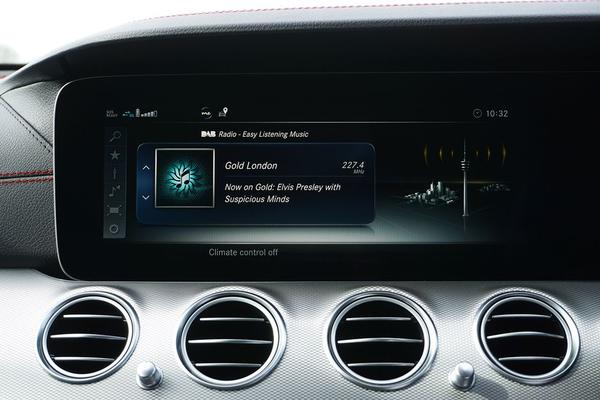
A DAB car radio upgrade can give an older vehicle access to digital-only stations without replacing the car itself. In the UK, though, buying a receiver is only half the job. DAB and DAB+ compatibility, the connection to your existing speakers and—especially—the aerial determine whether your new setup works smoothly on the road.
Check What Your Car Already Supports
Start by looking through the radio’s source menu and owner’s manual. A button marked “Radio” does not necessarily mean the unit receives DAB. Some cars have an optional digital-radio module, while others need additional hardware. If DAB is listed but stations are missing, try a full station scan first.
Check for DAB+ specifically. DAB+ is a more efficient version of digital broadcasting, and some UK stations use it. A DAB+ car radio normally receives standard DAB as well, but an older DAB-only receiver may not decode DAB+ services. When buying new equipment, choose explicit support for both rather than trusting a vague “digital radio” label.
Identify your audio connections: AUX input, Bluetooth, USB and the existing head unit’s physical size. These details narrow down your options.
Choose the Right Upgrade Route
Fit a DAB+ adapter to the existing radio
A car radio adapter is usually the least disruptive option. Its own receiver picks up digital broadcasts and sends audio to your existing stereo, typically through AUX or a short-range FM transmitter. The original speakers and dashboard radio stay in place.
If your stereo has an AUX socket, that connection is generally preferable to FM transmission because it avoids competing with nearby FM stations. An FM-transmitting adapter can still work when AUX is unavailable, but you may occasionally need to select a clearer FM frequency. Position any new display or controls without obstructing your view.
Replace the head unit
A replacement stereo with built-in DAB+ offers a more integrated result, often with straightforward station presets, Bluetooth and hands-free features. It makes sense when your current unit is dated or unreliable and the dashboard can accommodate a compatible replacement.
Check more than the opening size. You may need a vehicle-specific fascia, wiring harness, aerial adapter and steering-wheel-control interface. Some factory stereos also handle reversing cameras, vehicle settings or parking alerts. Removing them without checking compatibility can mean losing useful functions. Where the car has a deeply integrated system, ask a reputable car-audio installer to confirm what’s possible.
Use internet radio as an alternative
A smartphone can play live radio through Bluetooth, AUX or a supported in-car interface. This avoids fitting a receiver but relies on mobile data and network coverage, unlike DAB broadcasting.
The DAB Aerial Matters More Than Many Drivers Expect
A standard FM aerial is not automatically suitable for DAB. Some vehicles can use an appropriate combined aerial or compatible splitter, but others need a separate DAB aerial. Match the aerial and connector to your receiver rather than assuming the factory roof antenna will work.
Adhesive windscreen aerials are convenient for adapters. They often include a grounding strip that must make suitable contact with the vehicle’s metal bodywork according to the manufacturer’s instructions. Poor placement or grounding can produce disappointing reception even when the receiver itself is fine. Heated or metallised windscreens may also affect performance; check the aerial maker’s placement guidance.
A properly fitted roof-mounted aerial can be a strong choice for longer journeys. Magnetic aerials are another possibility where suitable, but they need secure positioning and careful cable routing. Never route wiring across an airbag deployment area or leave loose cables near pedals.
Install and Test Before Tidying the Cables
For a typical adapter installation, connect the recommended DAB aerial, power the unit and link its audio output to the car stereo. Perform a full scan while parked in an area with expected reception. Save a few national and local stations, then check audio through the vehicle speakers.
Next, take a short, familiar drive. For example, someone commuting from a town centre onto rural roads should test both sections before permanently fixing the aerial and hiding its cable. A receiver that works perfectly on the driveway might reveal aerial-placement problems once the car is moving.
If installing a replacement head unit, follow the vehicle and stereo manufacturers’ instructions, disconnect power where specified and use appropriate fitting accessories. Seek professional help if the job involves complex factory wiring or safety systems.
Troubleshoot Missing Stations and Dropouts
Unlike FM, which can fade into hiss, DAB reception may sound clean until the signal becomes too weak, then cut out. That behaviour does not automatically mean the radio is faulty. Coverage varies with terrain, transmitter networks and the particular station or multiplex.
If reception is unreliable, work through the likely causes in order. Try a fresh station scan in a known coverage area. Check whether the problem affects every station or only one group. Revisit the DAB aerial’s position, grounding and connections, and move any poorly shielded USB chargers or other accessories away temporarily to test for interference.
A missing local station may simply fall outside its broadcast area. Smaller local multiplexes do not necessarily cover the same roads as national services. Check official coverage information before buying another receiver. If your system uses an FM transmitter, distinguish a noisy FM link between adapter and stereo from weak DAB reception at the aerial.
What Should You Budget For?
Compare the whole installation, not just the price on the receiver box. An adapter may need a separate aerial, power connection and mounting accessories. A replacement unit can involve a fascia kit, interface modules and professional labour. A bargain stereo becomes less attractive if it disables steering-wheel buttons or requires expensive integration work.
If your original radio works well and offers AUX, a DAB+ adapter is a sensible first option. If the stereo itself needs replacing, a compatible DAB+ head unit can deliver a cleaner long-term setup. Related reading worth exploring includes choosing a replacement car stereo, diagnosing radio reception problems and comparing AUX with Bluetooth audio.
Frequently Asked Questions
Can I add DAB radio without replacing my car stereo?
Yes. A DAB+ adapter receives digital broadcasts and sends sound through your existing radio, commonly using AUX or an FM transmitter. Confirm the adapter’s aerial and power requirements before ordering.
Why does my DAB radio cut out while driving?
The signal may be weak along that route, or the aerial may be poorly positioned, grounded or connected. Test several stations in a known coverage area and check the aerial installation before replacing the radio.
Is FM radio being switched off in the UK?
There is no single confirmed nationwide FM switch-off date that drivers need to plan around. An upgrade is mainly about accessing digital services now, not responding to an imminent universal deadline.
Make the Upgrade Fit Your Driving
The most successful DAB car radio upgrade is not necessarily the most expensive. Choose a DAB+ compatible receiver, match its connection to your existing stereo and give the aerial installation proper attention. Test reception on roads you actually use before calling the job finished; that practical check often makes the difference between a frustrating add-on and a worthwhile improvement.